Antivirus Reports


Anti virus reports are available as summary reports which give a detailed listing or as analytical reports which provide counts.


Antivirus Summary Reports

Anti virus reports gives the detailed list of anti virus reports based on the filter condition selected as shown below.


Reports-Auto-AVSummary.jpg

Serial No

       Field Name

Description

    1  

Title

Enter the title of the report.


    2

Description

Brief description of the report to be created.


    3

Report Type

Select the type of the report as Antivirus Summary Report.


    4

Node Selection


Criteria

Select the appropriate filter criteria (OU/domain/OS/Device Category/Baseline Compliant Nodes) to be displayed in the report.


Organization Unit/Domain/OS/Device Category/Baseline Compliant Nodes


Select the corresponding criteria.


Select Hosts

By default ‘All Hosts of Bangalore OU’ will be selected (If 'Bangalore’ is the OU selected). If only specific hosts needs to  be selected then click on the sign ‘binocular.gif’ to select the hosts from the ‘Search Hosts’ window.

   5

Fields Selection

Select the fields which have to appear in the report columns.


Filter

In the ‘Type’ drop down, select the field types associated with the filter  to be displayed in the report.


Type

Select all the required fields. These fields will be displayed as a separate column.


    6

Advance Filter

This filter is used to display the data based on the fields and the criteria selected.


Filter

Select the fields.


Type

Select the field type.


Criteria

Select the condition.


Value

Enter the value for the selected field type.


    7

Time Scale

Select the appropriate time scale for which the report details are required. You can also enter a custom time period in the boxes.

    8

Access To

The Access control permissions for the Report can be set here.


Role

Select one or more Roles for which the permission has to be given.


Users

Select one or more Users for whom the permission has to be given.


Access Permissions

Check one or more boxes to give permission to 'View', 'Edit', 'Delete' reports or check on 'All' if all permissions are to be given.


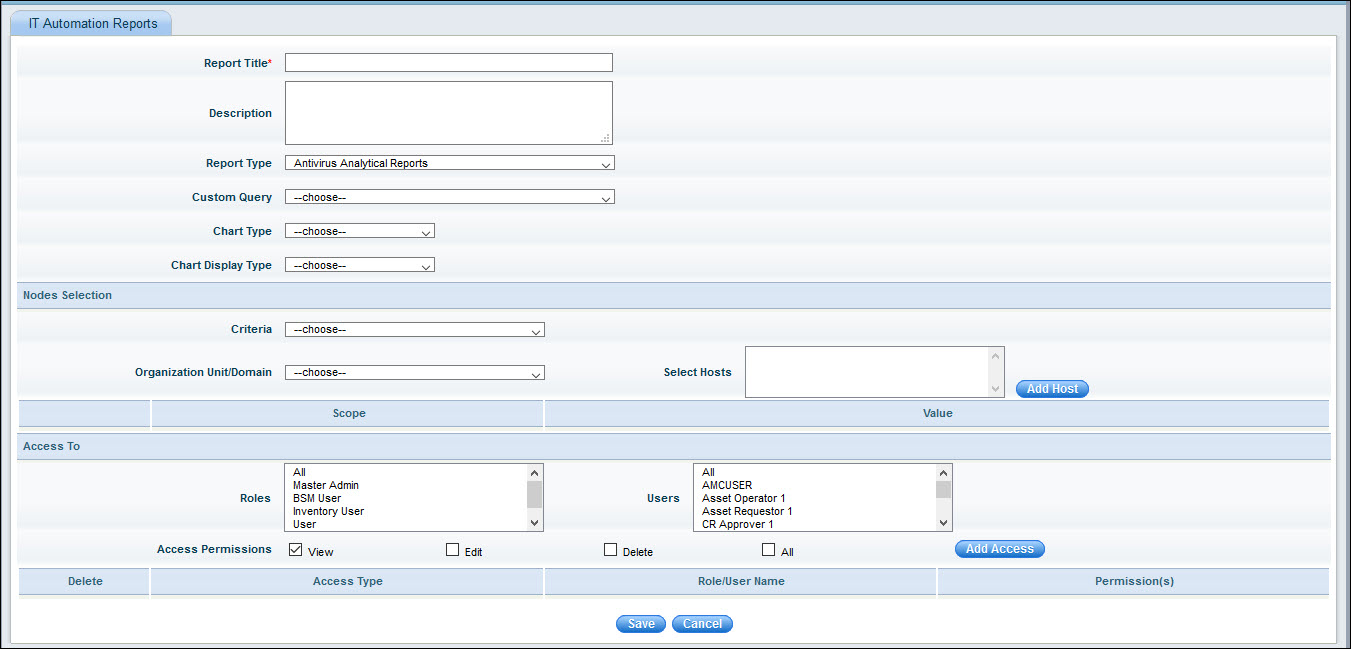
Antivirus Analytical Reports


Anti virus analytical reports provide analysis of based on the antivirus related custom queries which are in-built.


Reports-Auto-AVAnaly.jpg

Serial No

       Field Name

Description

    1  

Title

Enter the title of the report.


    2

Description

Brief description of the report to be created.


    3

Report Type

Select the type of the report as Antivirus Analytical Report.


    4

Custom Query

Select the custom query.

    5

Chart Type

Select the Chart Type from  'Bar', 'Stacked Bar', 'Pie', 'Trend' and 'Summary'.

    6

Chart Display Type

Select the Chart Display Type as 'Single' or 'Multiple'.

    7

Node Selection


Criteria

Select the appropriate filter criteria (OU/domain/OS/Device Category/Baseline Compliant Nodes) to be displayed in the report.


Organization Unit/Domain/OS/Device Category/Baseline Compliant Nodes


Select the corresponding criteria.


Select Hosts

By default ‘All Hosts of Bangalore OU’ will be selected (If 'Bangalore’ is the OU selected). If only specific hosts needs to  be selected then click on the sign ‘binocular.gif’ to select the hosts from the ‘Search Hosts’ window.

    8

Access To

The Access control permissions for the Report can be set here.


Role

Select one or more Roles for which the permission has to be given.


Users

Select one or more Users for whom the permission has to be given.


Access Permissions

Check one or more boxes to give permission to 'View', 'Edit', 'Delete' reports or check on 'All' if all permissions are to be given.