
Asset Reconciliation is used to map systems discovered through inventory collection to the assets defined in CMDB. This has a number of uses, for example the reconciliation process helps in uncovering systems which have been purchased but are not being used or systems on the network but not in the asset database in which case they could be outside the purview of a financial system.
A direct way of mapping assets to inventory is to link the inventory while creating the assets. However this is a tedious process and mostly the assets would be imported in bulk from Excel sheets.
The typical practice is while defining the asset type, the reconciliation type is configured. Reconciliation types include Host name, MAC ID or BIOS Serial No or the Agent Tag. In the case of Agent Tag, when the agents are being installed on the end systems, the tags need to be made unique.
Based on the reconciliation type for the asset type, the actual value for the attribute is entered into the Reconciliation Rule. Once the assets are imported and created, during the next discovery, the system uses the value in the Reconciliation Rule to map against the corresponding field in the collected inventory. This can be reviewed and approved in bulk.
Click on 'Asset Reconciliation' tab in CMDB. The asset reconciliation screen is displayed.
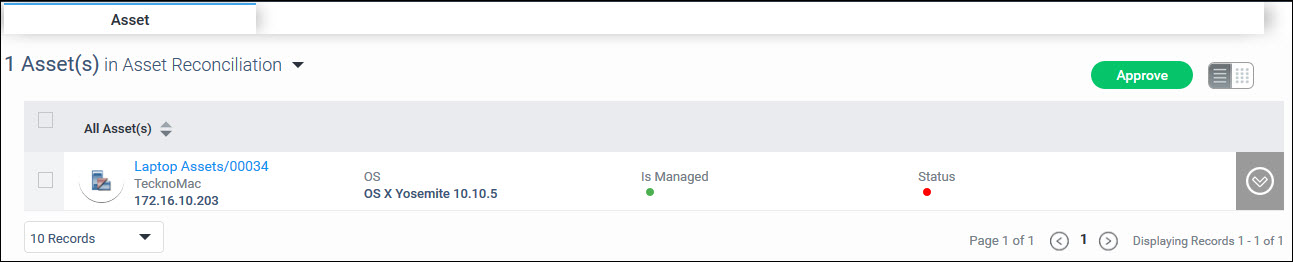
Click on the down arrow against the asset. The Asset details along with inventory information is displayed.
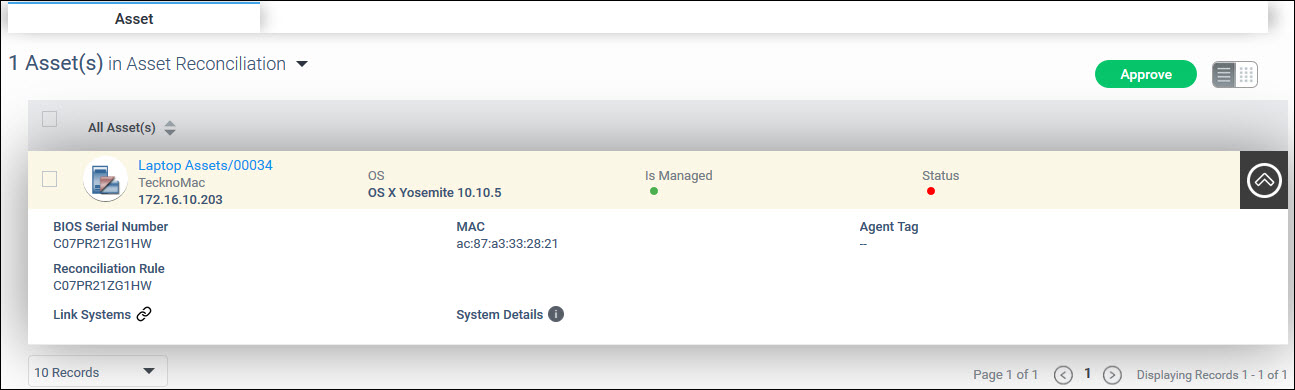
To know the number of systems linked click on 'System Details'. A screen pops-up with the details of the systems.

While normally there should be 1 system linked, there could be more if there are systems with duplicate references like BIOS serial numbers or host names etc.
Select the ‘Link Systems’ icon to map the systems if there is more than 1 linked. Select the correct system and click on 'Map System'.
Select one or more assets which have
the status  (Not Linked with
Inventory) and click on 'Approve'
to proceed to accept the reconciliation done by the system. '
(Not Linked with
Inventory) and click on 'Approve'
to proceed to accept the reconciliation done by the system. '
Once the reconciliation is done,
the status turns  (Linked
with Inventory)
(Linked
with Inventory)
A status of  indicates that no system has been found for reconciliation.