
After installing SapphireIMS XMPP Plug-in (refer Getting Started Guide for the installation), you can change the XMPP ports as explained below.
Open conf directory inside SapphireIMS XMPP server installed path
Edit openfire.xml file in <SapphireIMS XMPP-Install Path>/conf directory
Search for <adminConsole> tag, under which both <port> and <securePort> tags are meant for XMPP server management. Change the desired port.
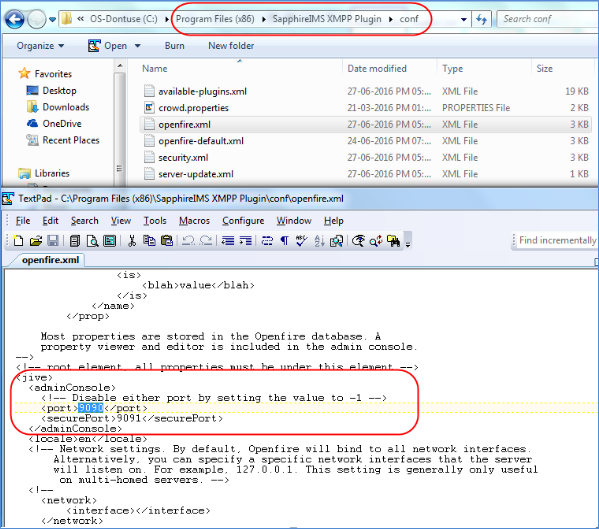
Connect to MySQL `sappxmpp` database schema where XMPP server is linked
Execute the below SQL command after substituting value for <PORT>,
update `ofproperty` set propValue = '<PORT>' where `name` = 'adminConsole.port';
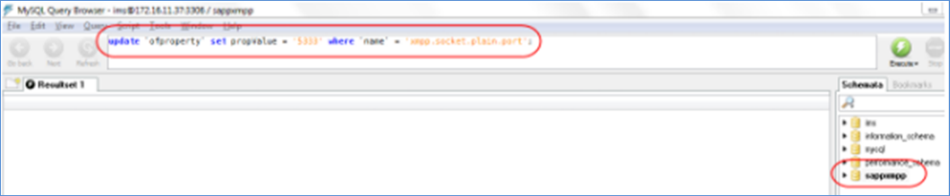
Restart the XMPP server and configure the settings change in SapphireIMS
Connect to MySQL `sappxmpp` database schema where XMPP server is linked
Execute the below SQL command after substituting value for <PORT>,
update `ofproperty` set propValue = '<PORT>' where `name` = 'xmpp.socket.plain.port';
Restart the XMPP server and configure the settings change in SapphireIMS
If MySQL server is getting ported, take sappxmpp database schema dump from source and restore it in destination MySQL server
Open conf directory inside SapphireIMS XMPP server installed path
Edit openfire.xml file in <SapphireIMS XMPP-InstallPath>/conf directory
Search for <database> tag, under which <serverURL> has the jdbc connection string can be modified for connection related changes
Any other parameters can also be updated on the below available other tags in <database>
Execute the below SQL command after substituting value for <CONNECTION_STRING>,
update `ofproperty` set propValue = '<CONNECTION_STRING>' where `name` = database.defaultProvider.serverURL';
Restart the XMPP server and configure the settings change in SapphireIMS
XMPP informer node on SapphireIMS server will use the following message pattern to signal XMPP agent on SapphireIMS Agent.
{Executable key}${Module key}
Executable keys are:
1 - SapphireIMS Agent
2 - Task agent
3 - Agent service tray icon
4 - Sapphire Backup
Whereas, Module keys are referred from lookuptablesdetail of table identifier 135.
This message will be encoded using Base64 before.E.g. For automation job signaling (1$3), the xmpp message for agent will be MSQz
Note: More than one job will be consolidated and sent over a single XMPP message.
Some of the key points considered for XMPP signal are:
XMPP informer will consolidate all available jobs for respective SapphireIMS Agent and signals the XMPP receiver client as single notification
Every signal received from XMPP informer will be acknowledged by SapphireIMS Agent through web service calls. If delay in acknowledgement is found (900 seconds by default - configurable from global settings), XMPP informer will resend the signal.