
This feature allows you to perform client and server side validations for any user specific action by writing scripts that are dynamically executed. The validations can be performed for fixed fields or additional fields.
In the 'Settings' panel, click on the '+' sign to expand 'Fields & Forms'. Click on 'Customization Scripts' to display the Customization Scripts listing page.
Select the service desk project for which the customization scripts need to be written
Select either 'Fixed Fields' option or 'Additional Fields' option
Click ‘Add’ to add the scripts
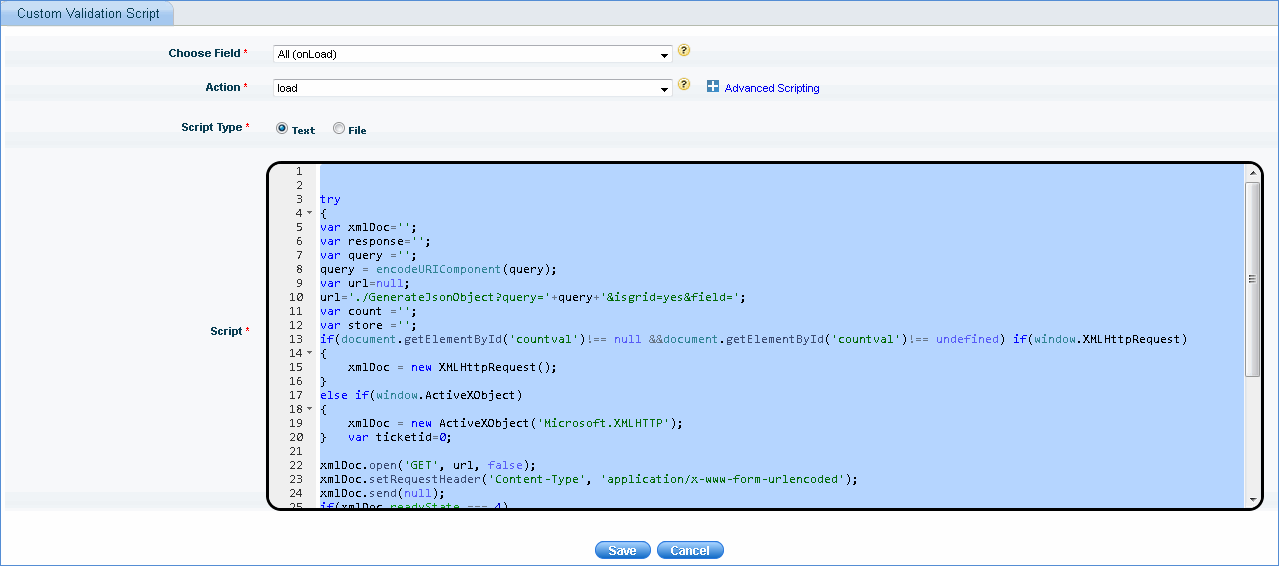
1. Choose Field: The field represents the field name to be validated. In case of additional field, field ID is added to field name to make it handy.
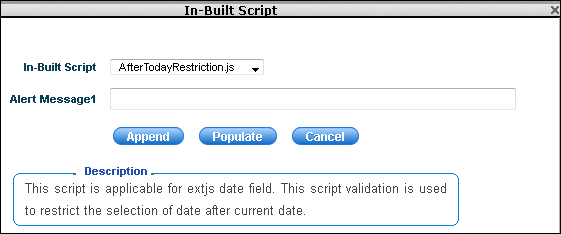
2. Action: The method/event on which the script should be fired. In case, any scripts are available for this action, the in-built script icon ' ' is displayed. Click this icon to select the in-built scripts to be either appended or populated to the 'Script' box
3. Script Type: Select 'File' option if the script has to be loaded from a file saved on the disk
Advanced Scripting: Click the '+' sign to expand to define the custom method and arguments. This is an optional feature which helps you to add different actions for the same field. For example, if you want to add a mouse over message to a text field, or you want to display a message to alert the user for entering invalid data, this feature can be used.

1. Custom Method: This is an optional field where you can add your custom method for a particular action. The custom method option provides you with different actions for each method.
2. Arguments: This is an optional field where you can add your custom arguments for custom methods.