
In order to manage the Service Desk record, an Impact level is assigned to the record during submission. The Impact specifies the business impact the issue has and together with Urgency determines the Priority to be assigned for the record. By default, in built projects have the Impact levels of 'High', 'Medium' and 'Low' defined. In addition, new Impact levels can be added. An Impact can be specified for each Service. While submitting the record, the Impact can be selected from the configured Impact levels.
Click on 'Urgency, Impact & Priority' option on the right hand side panel.
Click on 'Impact'. The list of Impact levels is displayed.
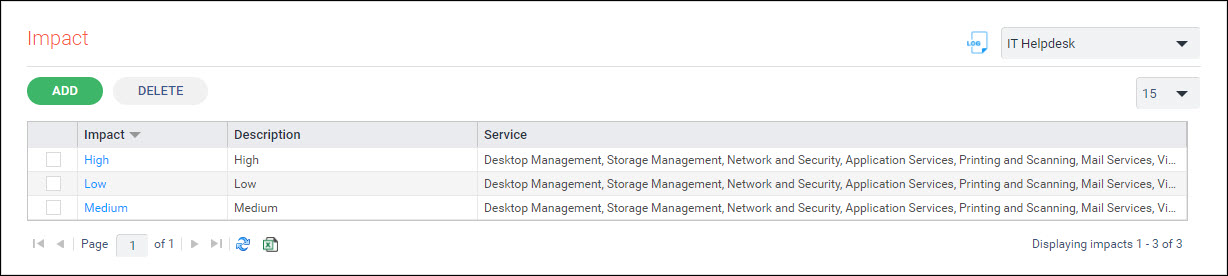
Click on 'ADD' to add a new Impact level or click on any Impact level to modify. The Impact addition screen is displayed.
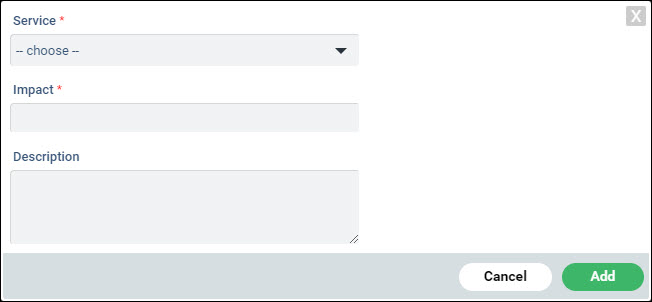
Select one or more 'Service' from the drop down list.
Enter the 'Impact'.
Enter the 'Description'.
Click on 'Add'.
To delete an Impact level, select the Impact and click on 'DELETE'.