
SapphireIMS supports discovery using discovery credentials provided either by using agents or agent less machines. Since SapphireIMS server is periodically updated with data collected on the agent, it is more effective to capture inventory information from agents rather than from agent less machines. Therefore, it is important for organizations to know about the number of systems in which agents are not installed.
If a machine does not have an agent installed on it, it is an agent less machine. But there may be systems in SapphireIMS that are not discovered. To detect such systems, you need to rely on sources such as active directory, CMDB assets, CSV file or Ping. Using these sources, you can obtain host names or IP addresses of systems that exist in the organization. Then you can easily identify those systems that do not have SapphireIMS agent installed.
To perform missing agent reconciliation, follow the steps below.
Click the Settings tab. In the Asset and Inventory Management section, click Agent Configuration
In the Settings panel, click Missing Agent Reconciliation
All the missing agent reconciliation rules defined are listed. Click 'Add' to define a new rule
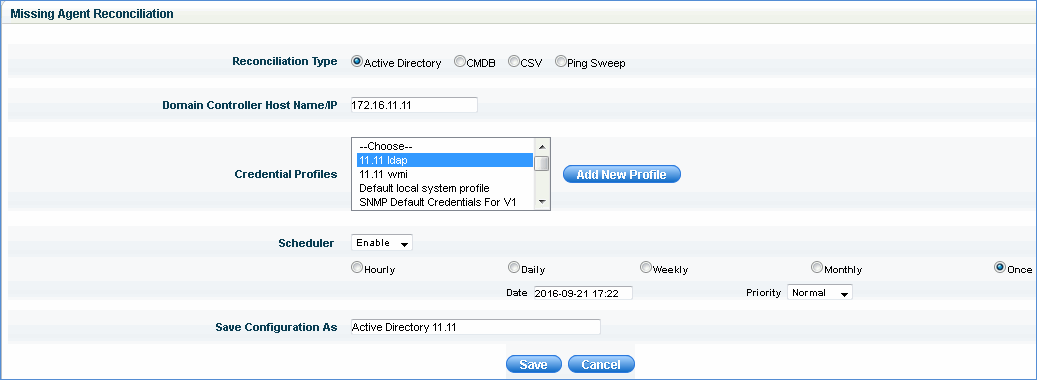
For detecting systems through AD, you need to provide the credentials to connect to the LDAP server or active directory as shown below
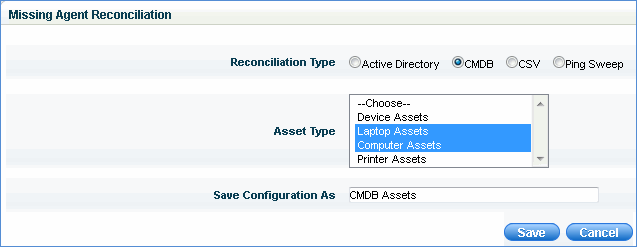
For detecting systems through CMDB, you need to specify the asset types to be considered. Only if an asset is linked to a host, that host can be an agent . If an asset is not linked to a host, it means that agent is missing on the host system.
For detecting systems through CSV, you need to import the corresponding CSV file with host name or IP address of all the systems. The file is checked with SapphireIMS inventory for missing agents
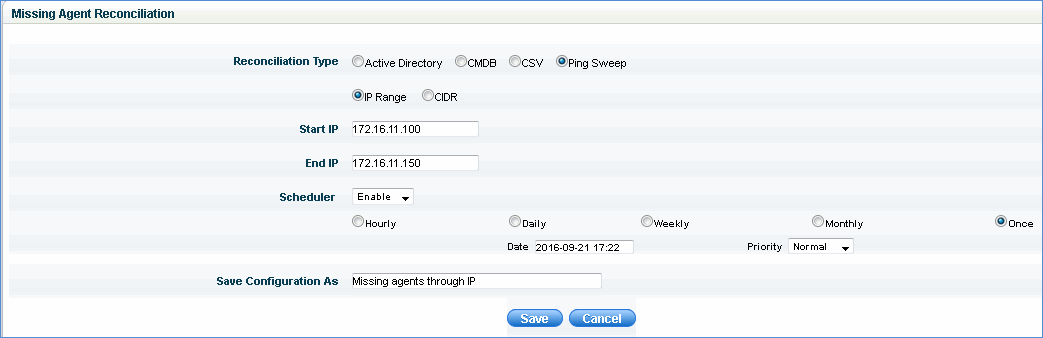
For detecting systems through ping sweep, you need to specify the IP range or CIDR. Each system is pinged and the host names and IP addresses of systems responding to the ping is checked with the inventory to obtain details of hosts not having agents.
To view the list of systems which are missing agents, select 'Settings' and click on 'Node Rules Engine'. Click on 'Missing Agents' option in the left hand menu. A list of systems with missing agents is displayed.

Select the 'Source Type' from the list to view the list of systems reconciled against that source. You can use the 'Filter' options to search for a specific system.