
Mobile Dashboard Settings is used to configure the widgets for the Service Desk module on the mobile application. The widgets are charts which can present the data in different forms for analysis.
Select 'General Settings' option on the right hand side panel.
Click on 'Mobile Dashboard Settings'. The Mobile Dashboard Settings listing screen is displayed.

Click on 'ADD' to add
a new widget or click on  to edit an existing chart.
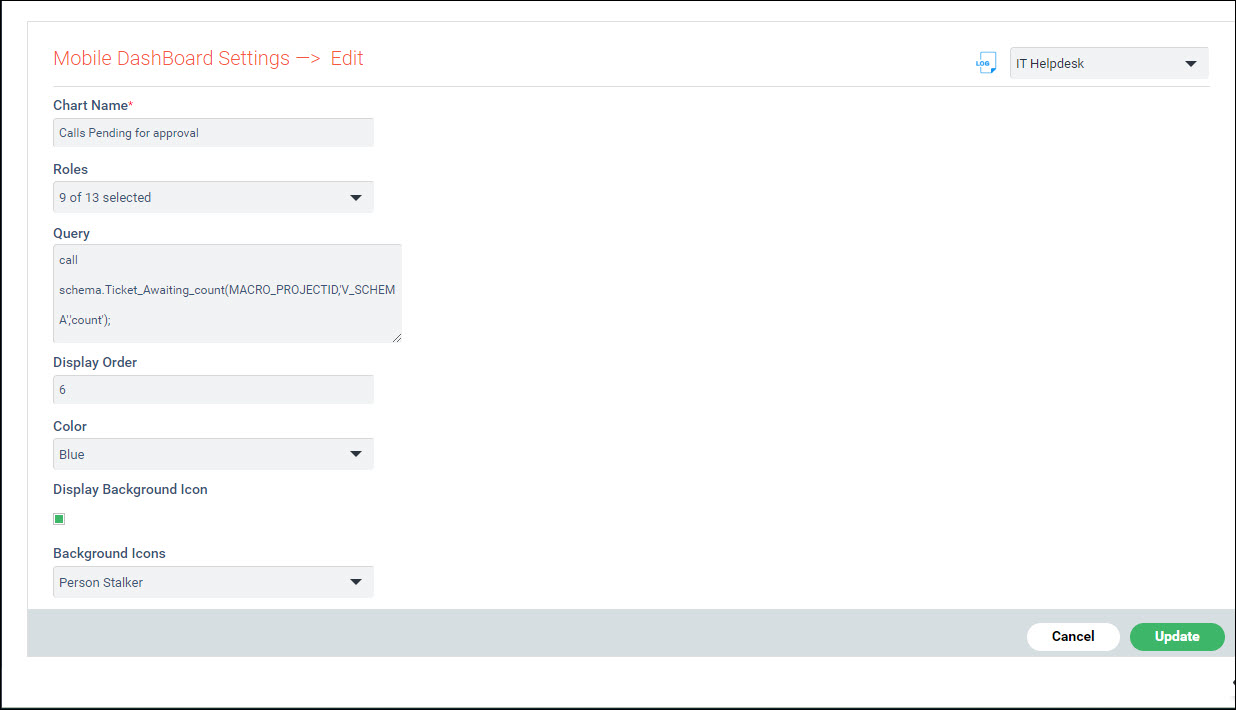
The fields are explained below.
Serial No |
Field |
Description
|
1 |
Chart Name |
Provide a name to identify the widget.
|
2 |
Roles |
Select the 'Roles' for which the chart should be displayed. |
3 |
Query |
Enter the 'Query' used to fetch the widget data from the database.
|
4 |
Display Order |
Enter the 'Display Order' on the screen. |
5 |
Color
|
Select the 'Color' for the chart. |
6 |
Display Background Icon |
Check this box if the background icons have to be displayed on the widget. If this is disabled, then the count of records is displayed.
|
7 |
Background Icons |
Select the 'Background Icons' for the chart.
|
Click on 'Save' or 'Update'.