
Users can view allocated asset information in the ‘My Asset’ tab. This tab will be visible only if the necessary ‘Access Type’ is provided at the time of role definition and the user is allocated at least one asset. Asset allocation can be configured to notify the user to whom the asset is allocated and in turn have the user send an acceptance or denial via e-mail. Further if the user does not respond, auto acceptance can be configured, which will cause the acceptance automatically after certain number of days.
Notes: 1. All the Users with access to ‘Asset’ module can access ‘My Asset’ from the ‘CMDB’ menu
2. If user acceptance mail template is configured, Action column is visible to accept or deny the assets after allocation. To configure user acceptance mail, go to Settings > Asset and Inventory Management > Assets > User Acceptance Mail
3. The assets are auto accepted if there is no input from the asset owner in <n> days where 'n' is the number of days specified in the global settings key 'Asset user acceptance timeout' (default value is seven days)
Click on 'My Asset' option in the left hand menu.
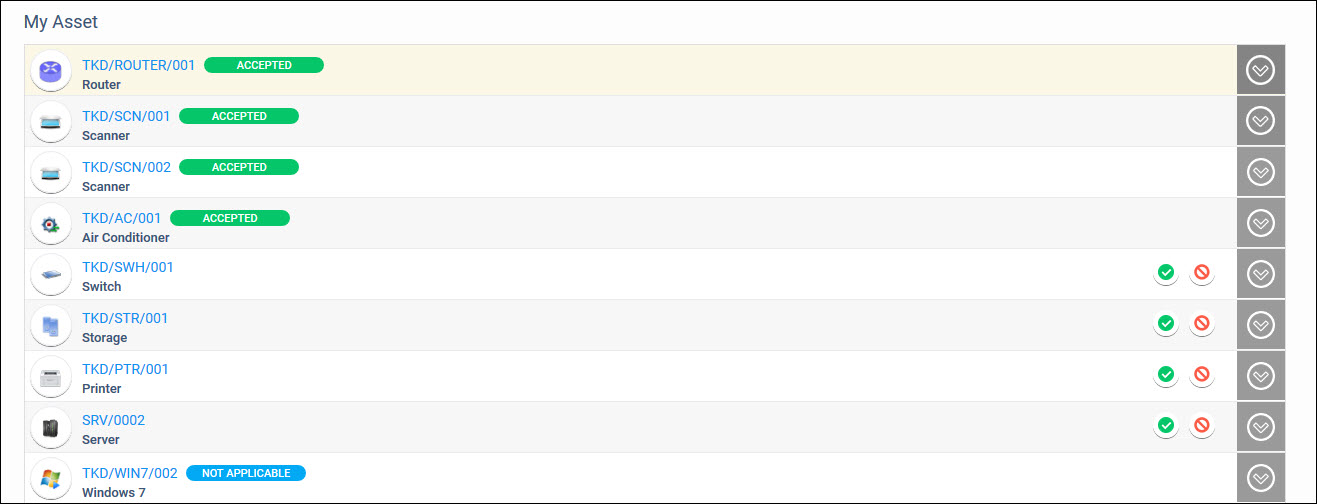
A tag is displayed against assets which have been accepted showing
as 'Accepted'. For assets which do not need acceptance a tag is shown
as 'Not Applicable'. For assets awaiting acceptance the actions are
shown. Click on  to accept the asset and click
on
to accept the asset and click
on  to deny the asset. In either case it prompts
for a comment which you can enter. The comment is included in the
asset acceptance e-mail.
to deny the asset. In either case it prompts
for a comment which you can enter. The comment is included in the
asset acceptance e-mail.
If the user acceptance mail is configured with either a link or button, you can click on it to get redirected to the 'MyAsset' screen. If you are not logged-in to SapphireIMS, you will be prompted to login.