
SapphireIMS can flash a notification message for selected events. For example, if popup notification is enabled for arrival of new records, a notification is flashed on the portal whenever a new record is submitted. Similarly on the Mobile, SapphireIMS supports push notifications which alerts the user on various events.
Click 'Settings' and in the ‘Advanced System Settings’ section click on 'Global Settings'. Update the value of ‘Enable or Disable Popup Notification’ to 1.
You can change the value of the setting key 'TimeOut Interval for PopUp Notification' to a value between 5 and 60 seconds. The default value is 15 seconds.
Select 'General Settings' option on the right hand side panel.
Click on 'PopUp Notification'. The Pop-up Notification configuration screen is displayed.
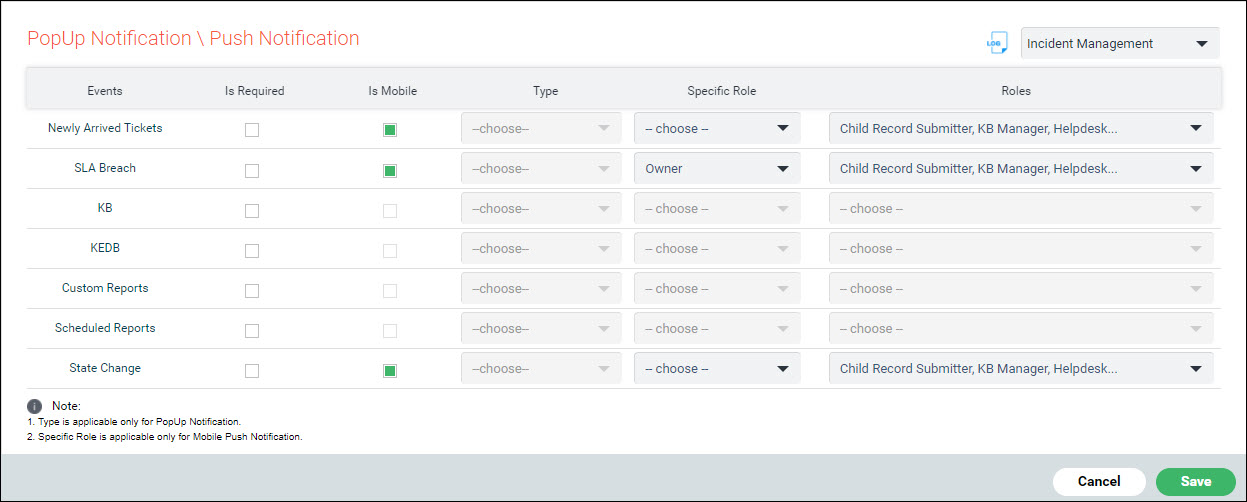
The fields are described below.
|
Click on 'Save' to save the updates.