
A product key, also known as a software key, is a specific software-based key for a computer program. It certifies that the copy of the program is original. Activation is sometimes done offline by entering the key, or with software like Windows 8.1, online activation is required to prevent multiple people using the same key. Not all software has a product key, as some publishers may choose to use a different method to protect their copyright, or in some cases, such as free or open source software, copyright protection is not used.
Product keys consist of a series of numbers and/or letters. This sequence is typically entered by the user during the installation of computer software which is then verified by a function in the program.
The following help section explains how to add the new product key collection supported in SapphireIMS along with the existing supporting product key design.
In SapphireIMS, product key collection feature is enhanced to support more than 750+software (Ref Appendix 1) along with a provision to add new software for product key collection by the technician.
Go to Settings page -> Asset and Inventory Management -> Product Keys. This feature helps you to add the software support for product key collection and lists the existing product keys supported by SapphireIMS.
Click 'Add Product Key' to add the product key
This feature has two types of methods to collect the product keys - Registry method and WMI method.
Registry Method
Most of the software product keys are stored in the registry. These product keys can be retrieved by providing the correct registry path and the registry sub key name
The product keys are stored in plain text or in some encrypted form. We use the following encryption methods to read the product keys –
If the software belongs to Microsoft group, then it uses Microsoft style encryption type. SapphireIMS applies the Microsoft parsing type for the key which is retrieved from the registry location.
Example: The below image adds the Microsoft office 2007 Product key configuration
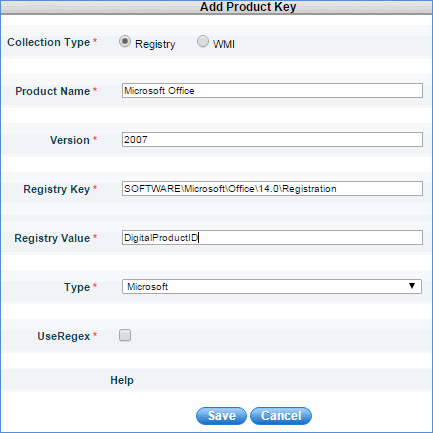
Product Name - Name of the product to be collected for the product key.
Version - Version of the product to be collected for the product key.
Registry Key - Location of the registry Path (HKLM is the default Root registry path)
Registry Value - Key name which holds the product key of the software.
Type -Type of encryption to be applied after collecting the product key from the registry
Ueregex- This field is used when the registry sub key name is in non-standard format in the machines. Example: For Microsoft SQL Server the product key gets stored in the sub key like XXXDigitialProductIDYY. XXX and YY stands for some random GUID. So the registry value does not have the standard value. By enabling “UseRegex” key, SapphireIMS tries all possible (substring) occurrences to find the product key of the product.
Note: In case the operating system is 64-bit, SapphireIMS tries to get the product key from both 64-bit and 32-bit path
Example:
A Product key configuration has been added in registry path as “Software\Microsoft\windows NT\CurrentVersion” and the sub key as “DigitalProductID”. When the inventory collection is triggered for the 64-bit machine, SapphireIMS tries for both 64 bit path and 32 bit registry path by connecting 32 bit and 64 bit WMI repository.
If the software belongs to the Adobe group, then SapphireIMS uses Adobe style encryption type. SapphireIMS applies the Adobe parsing type for the key which is retrieved from the registry location.
Example: For Adobe Reader 9.0, add the product key configuration in SapphireIMS as shown below:
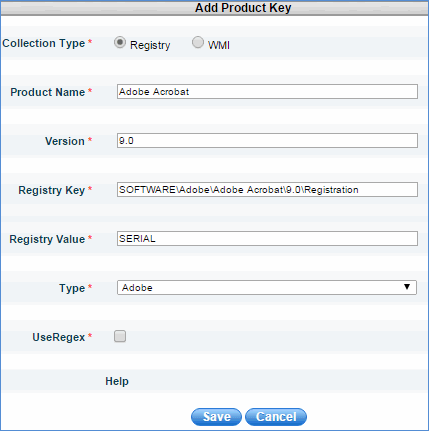
All the UI fields are explained in the Microsoft section. Same is applicable for this type also.
Most of the non Adobe and non Microsoft software do not use any parsing standard. For these software we need to use “Plaintext” style. So SapphireIMS does not apply any parsing logic, it queries for the product key as string data type and retrieves the product key.
Example: For AutoCAD product, the product key is stored as plain text.
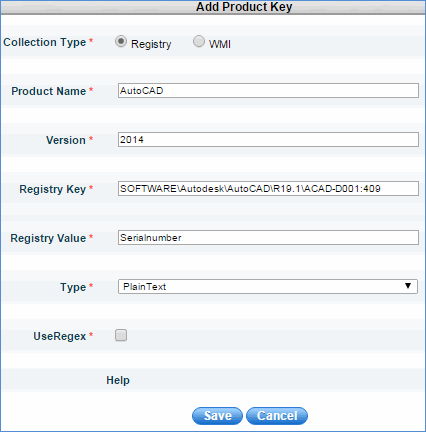
All the UI fields are explained in the Microsoft section. Same is applicable for this type also.
WMI Method
Some of the products like MS office 2013 do not store the product key in the registry. For these kind of software, the WMI method is used to retrieve the product key.
Example: By using WMI approach we are able to retrieve the partial product key of MS Office 2013.
Limitations: SapphireIMS is unable to collect product keys for the software which are registered online.
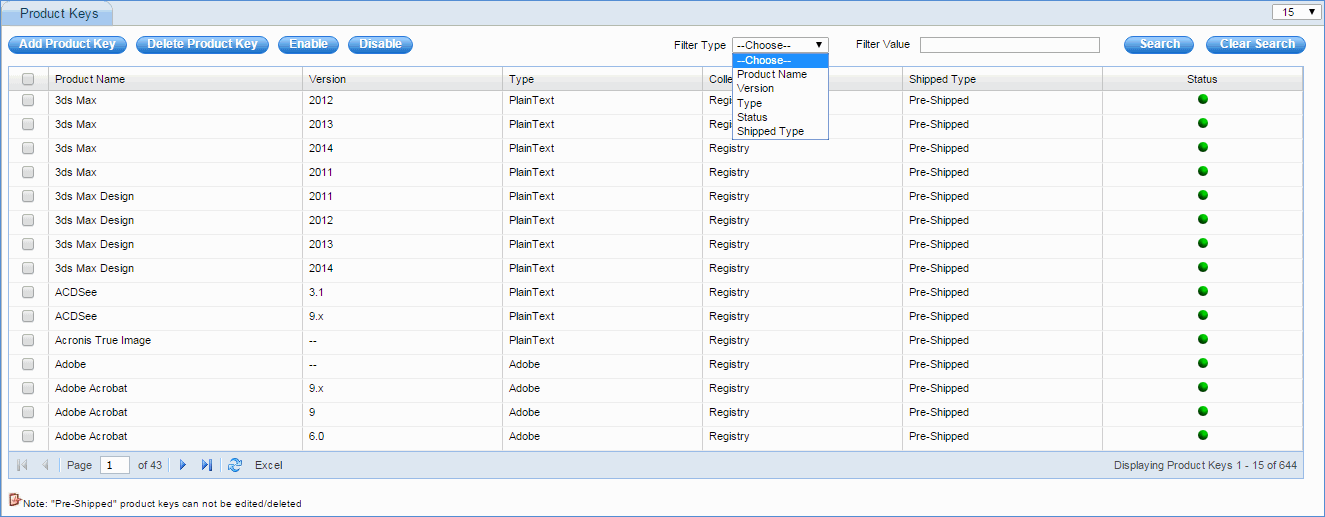
The software which is not required to collect the product can be disabled by using the Disable option
Pre-shipped products cannot be edited or deleted using the 'Delete Product Key' option
Excel import option is supported but it does not import the registry path and key or WMI class name and query column name. It imports only the data which is listed in the list view.