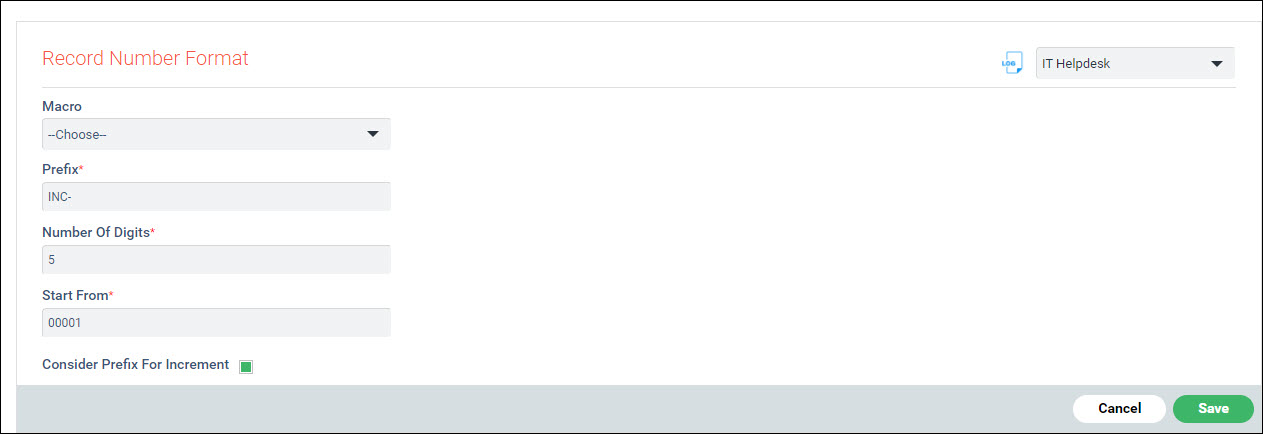
Serial
No. |
Field
name |
Description
|
1 |
Macro |
Select
Macro from Service Desk Fixed fields, Date field, Service
Desk Custom Fields, Asset Fixed Fields or Asset Custom Fields.
The short codes are also supported.
|
2 |
Prefix |
Enter
a 3 character prefix. The macro appears in {} after project prefix
|
3 |
Number
Of Digits |
Enter the
total number of digits a record number will have. For e.g. the
number of digits in the record number ‘INC-{Service Name}00001’
is 5
|
4 |
Start
From |
Enter the
number from which the record number needs to be started from for
e.g. ‘00001’ can be the first record number. The
new service desk record posted will now have the record number
as INC-service name selected in the record -00001
|
5 |
Consider
Prefix For Increment |
If this
box is checked, the record number will contain the prefix followed
by the record number in sequential order, else the record number
is generated randomly.
|