
The mode of submission of Service Desk records is known as 'Source'. While submitting the record, the source can be selected among the configured list.
There are in-built sources which as follows:
E-mail: This option is meant for records submitted through E-mail.
Phone: This option is meant for records logged over phone.
Web: This option is meant for records logged using the web portal.
Event Management: This is specific to Problem Management records and applies to records logged from generated alarms.
Incident Management: This is specific to Problem Management records and applies to records logged with an incident as a reference.
Pro-Active Management: This is specific to Problem Management records and applies to Problem Management records logged without an incident as reference.
New sources can be added in addition to these.
Click on 'Mode of Creation' option on the right hand side panel.
Click on 'Source'. The list of sources configured is displayed.
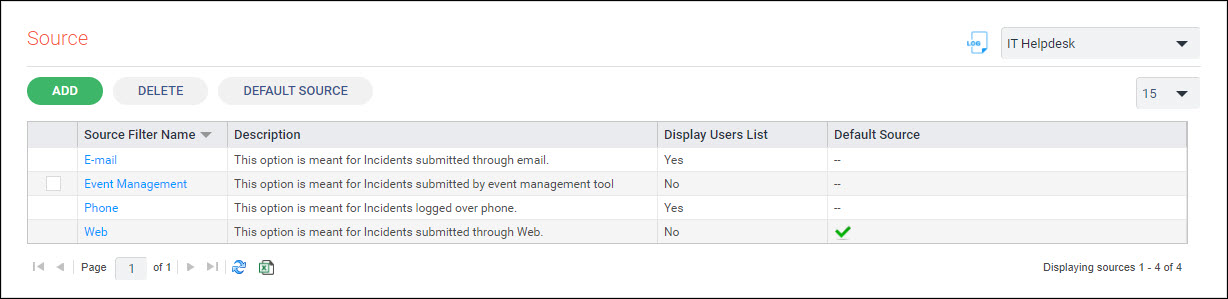
Click on 'ADD'. The source configuration screen is displayed.
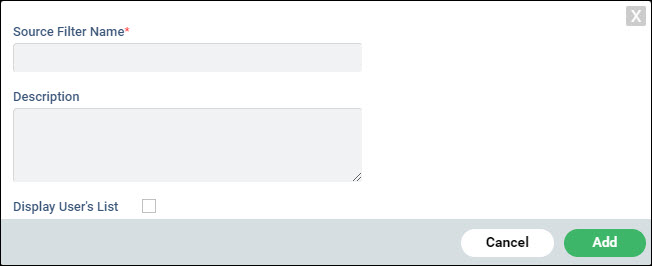
Enter the 'Source Filter Name' which will be displayed in the 'Source' drop down while creating the record.
Enter the 'Description'.
If the list of users needs to be displayed check the box 'Display User's List'. Note that this cannot be selected if the source is 'Web'.
Click on 'Add'.
To update the source configuration click on the source in the list.
To delete any source, check the box against the source in the list and click on 'DELETE'.
To set any source as the default, click on 'DEFAULT SOURCE'. When the record is being submitted the default source value appears in the drop down menu.
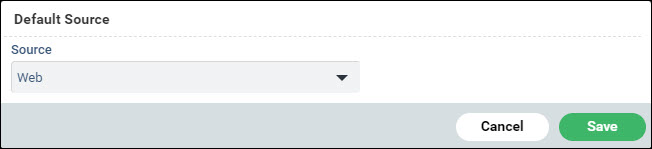
Select the default 'Source'.
Click on 'Save'.