
Sub Categories are the next level of classification for each Category. For example, the 'Software' category can have sub-categories like 'Configure Software', 'Performance Issue', 'Patch Update' etc. There are pre-shipped sub categories for the in-built projects.
Click on 'Categorization' option on the right hand side panel.
Click on 'Sub Category'. The list of Sub Categories is displayed.
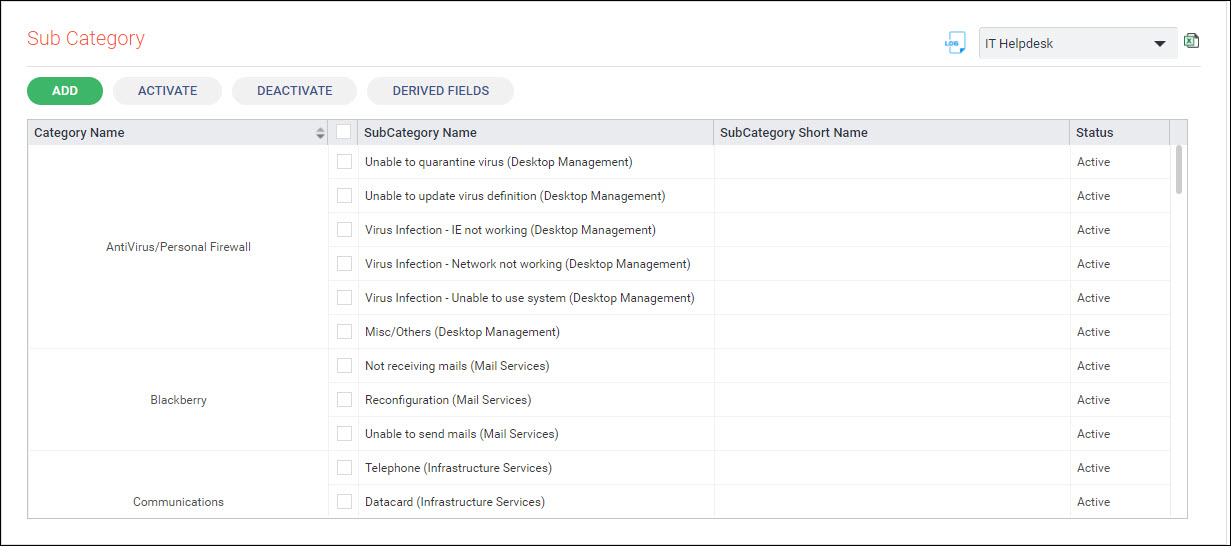
Adding a new Sub Category
To add a new Sub Category click on 'ADD'. The Sub Category addition screen is displayed.
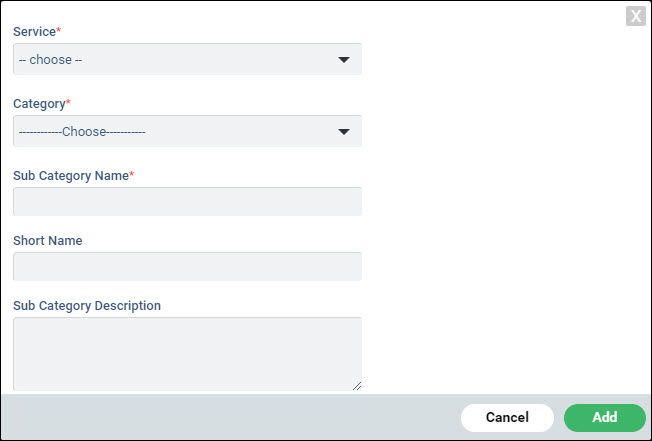
Select the 'Service' and 'Category' under which the Sub Category has to be added.
Enter the 'Sub Category Name', the 'Short Name' and 'Sub Category Description'.
Click on 'Add'.
To Deactivate a Sub Category, select the Sub Category and click on 'DEACTIVATE'. Once the Sub Category is deactivated, it cannot be used for classification of the record.
To Activate a Sub Category, select the Sub Category and click on 'ACTIVATE'.
Derived fields are additional fields which can be optionally defined to have further classification of records below the Sub Category. There are 3 levels of Derived Fields (Derived Field 1, Derived Field 2, Derived Field 3). Derived Field 1 is dependent on Sub Category. Derived Field 2 is dependent on Sub Category and Derived Field 1. Derived Field 3 is dependent on Sub Category, Derived Field 1 and Derived Field 2.
To define Derived Fields, click on 'DERIVED FIELDS'. The Derived Fields are listed.
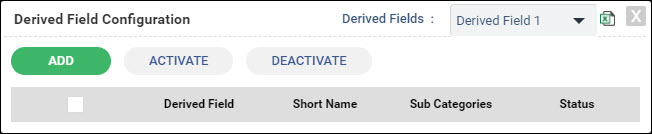
Select the Derived Field which has to be created.
Click on 'ADD'.
Select the Sub Category for which the Derived Field 1 has to be created.
Enter the 'Derived Field Value' and the 'Short Name'.
Click on 'Add'.
Repeat the steps to add more values for the Derived Field. These values are displayed in a selectable drop down list in the record against the Derived Field.
The display names for the Derived Fields can be changed through the Fixed Fields configuration screen.
To Deactivate or Activate Derived Fields, select the Derived Field from the list and click on 'DEACTIVATE' or 'ACTIVATE'.
 Note: For using the Derived
Fields, ensure that the Derived Fields are made visible (in the Fixed
Fields configuration).
Note: For using the Derived
Fields, ensure that the Derived Fields are made visible (in the Fixed
Fields configuration).