
Roles: Service Desk Supervisor, Service Desk Engineer
Incidents are typically assigned when they are in the 'New' state or 'Open' state. A Service Desk Supervisor can assign the incident to a Service Desk Engineer.
The following section lists the steps to assign an incident
1. Select the 'Incident' from 'Incident' > 'My Incidents' tab or 'Incident' > 'All Incidents' tab or search for the incident. Click the incident.
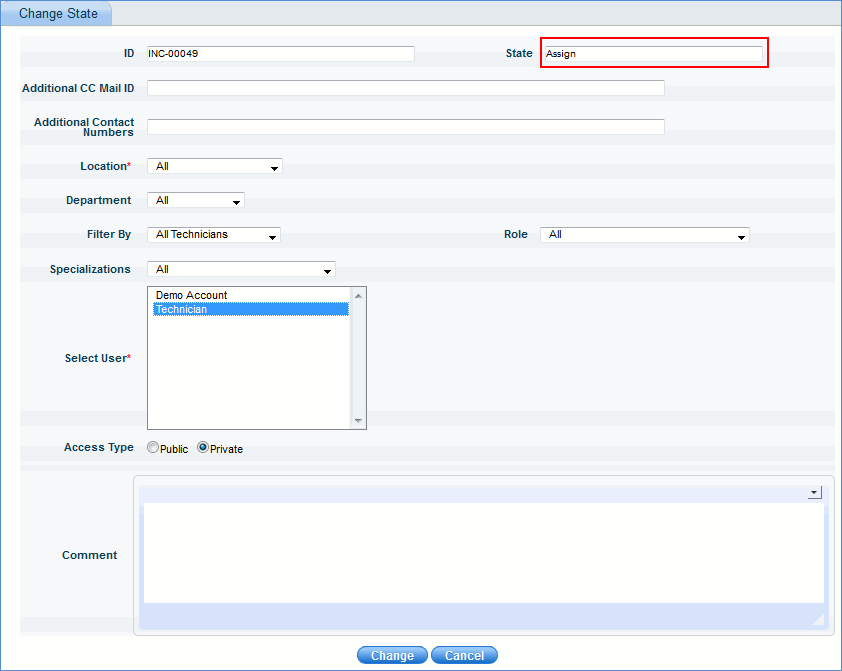
2. In the ‘Change State’ drop down list box, select ‘Assign’ to display the 'Change State' window.
3. Refer to the table shown below, select the required information and click 'Change'.
Note: 'Specializations' drop down is populated based on the Config Settings key 'Specialization type for the Technicians’
|
Note: Additional fields 'Additional CC Mail ID' and 'Additional Contact Numbers' are always displayed in the 'Change State' window. Modify as required.
4. The incident is now successfully assigned
