How to Submit Service Request on Generation of Faults and Alarms ?
All kinds of faults generated by the system
can be integrated with the Service desk module. This helps in organizing
the service delivery process. Various service desk integration profiles
can be defined which can then be used in thresholds and alarms.
This section explains the steps to create
an 'Alarm to Incident' profile.
1. Click 'Settings'
and from 'Fault and Notifications'
section, click 'Alarm to Record'
2. Click Add to define a new service desk
integration profile. Type the details as explained in the table below.
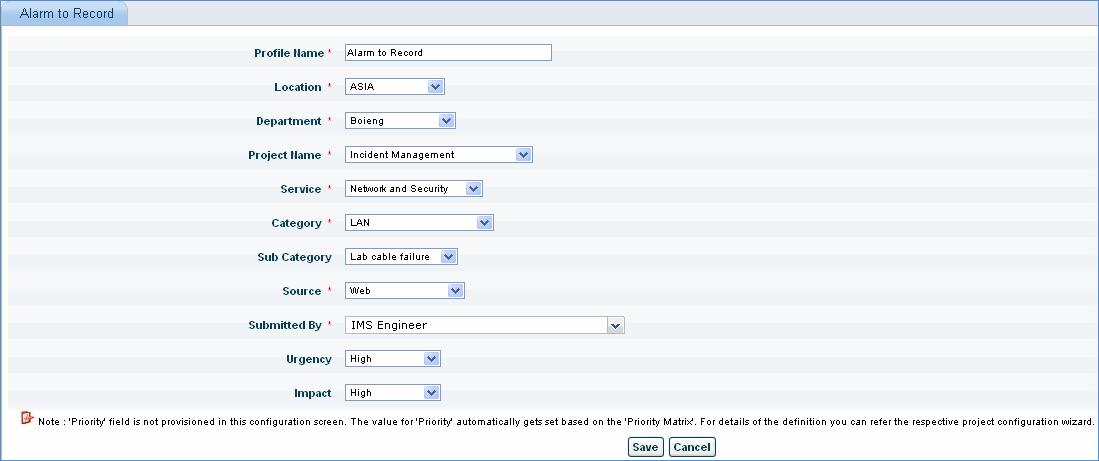
Service
Request Integration
Sr.
No |
Field
Name |
Description |
1 |
Profile
Name |
Name
of the profile
|
2 |
Location, Department |
Select
the Location in which the incident is to be submitted
|
3 |
Project Name |
Select
the project. Profile will be created for this project
|
4 |
Service |
Depending
on the project selected, the service drop down is populated. Select
the Service for which the incident is to be submitted
|
5 |
Category |
Select
the Category of the incident
|
6 |
Sub
Category |
Select
the Sub Category of the incident
|
7 |
Submitted
By |
Select
the submitter of the incident. The users having access to the
selected project will be listed in this drop down
|
8 |
Urgency |
Select
the urgency of the incident
|
9 |
Impact |
Select
the impact of the incident
|
|
