
Define the log archival path to collect and archive logs in a specified location. Archival path is mandatory for SapphireIMS to start log monitoring.
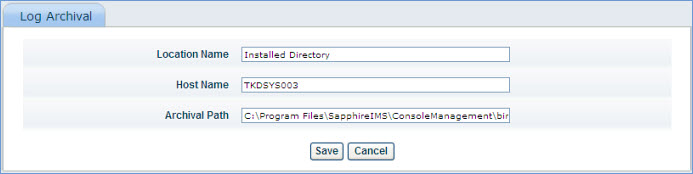
Windows Eventlogs, Syslogs and SNMP Traps collected from various sources will get collected in a user specified location as per the archival path mentioned in the image below.
1. To access log archival click ‘Settings’ and from ‘Fault and Notifications' section click ‘Log Archival’. The ‘Location Name’ indicates a user friendly name to refer the location of log archival.
2. Enter the host name of SapphireIMS installed machine in ‘Host Name’ box.
3. Enter the exact path in ‘Archival Path’ box. This is the location where the log files will be collected. This can be the installed directory of SapphireIMS or any desired location.
4. Click ‘Save’ to save the archival path. A folder named ‘LogMon’ will be created in the mentioned ‘Archival Path’.
 Important: Once the ‘Archival Path’ is added and saved, it is a must to restart SapphireIMS service