
SapphireIMS allows hardware monitoring through IPMI interface.
The Intelligent Platform Management Interface (IPMI) is a set of computer interface specifications for an autonomous computer subsystem that provides management and monitoring capabilities independently of the host system's CPU, firmware (BIOS or UEFI) and operating system.
IPMI (Intelligent Platform Management Interface) is the standard interface which allows administrators out-of-band system management.
System administrators can use SapphireIMS-IPMI to monitor platform status such as System Temperatures, Voltages, Fan speed, Power Supplies, Chassis, VRM etc.
1. Click Settings, from Business Service Monitoring section, click IPMI
2. Click Add
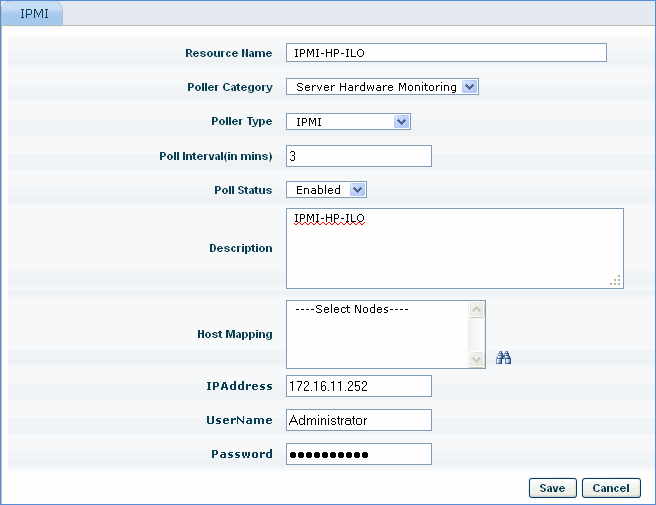
Sr. No |
Field Name |
Description |
1 |
Resource Name |
Provide the name through which the IPMI resource will be identified with |
2 |
Poller Category |
Select the poller name as ‘Server Hardware Monitoring’ |
3 |
Poller Type |
Select the poller type as ‘IPMI’ |
4 |
Poll Interval (in mins) |
Specify the polling interval for the application to be monitored. |
5 |
Poll Status |
By default the poll status would be ‘enabled’. Only if it is set to ‘Enabled’, the polling would be performed. |
6 |
Description |
A brief description of the resource that is added |
7 |
Host mapping |
Select the nodes where IPMI data collection is displayed |
8 |
IP Address |
Enter the IP Address of IPMI device |
9 |
User name and password |
Enter the access credentials of IPMI device |