
This screen allows you to configure the time interval for occurrence of business events. Business events refer to events which are pre- scheduled and occur at the same frequency e.g. payroll processing or weekly batch processing jobs processed on the server. It can also refer to custom business events such as batch processing job executed on the last Saturday of the financial year. Business events is used for better understanding of system behavior so that dynamic thresholds can be defined for performance metric accordingly. See Dynamic Thresholds for more details.
Click the 'Settings' tab. In the 'Business Service Monitoring' section, click 'Business Events'. This screen will list all the business events that are currently defined

Click 'Add' to add a new business event as shown below
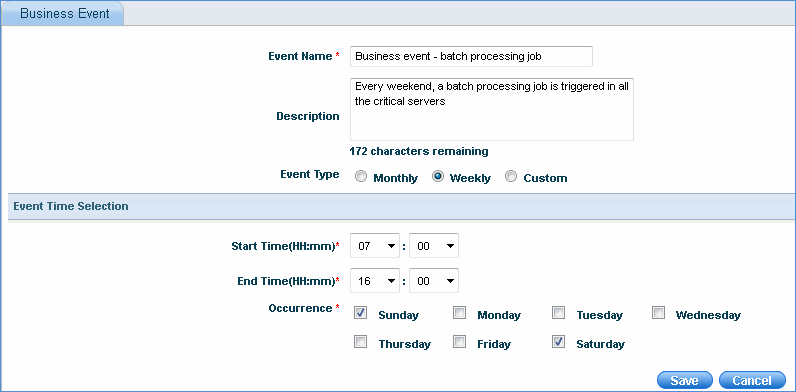
Enter the event name and description
Select the event type. Custom type allows you to select a time interval of your choice.
Select the start time and end time of the business events
Select the occurrence of the business events
Click 'Save'