
Capacity Planning is the process of predicting the production capacity needed by an organization to meet the changing demands for its products. IT capacity planning involves estimating the storage, computer hardware, software and connection infrastructure resources required over some future period of time.
In SapphireIMS, administrators can prepare in advance in order to avoid performance bottlenecks altogether by using capacity planning tool to predict in advance how servers should be configured to adequately handle future workloads.
Click the 'Settings' tab. In the 'Business Service Monitoring' section, click 'Capacity Planning'. Capacity planning can be defined only for the hosts/resources enabled for performance.
Note: A host profile needs to be defined which can then be mapped to capacity planning rules. The host profile can be defined for systems enabled for performance or for any configured custom poller/resource (which includes all the pollers associated with Synthetic Transaction and Application monitoring)
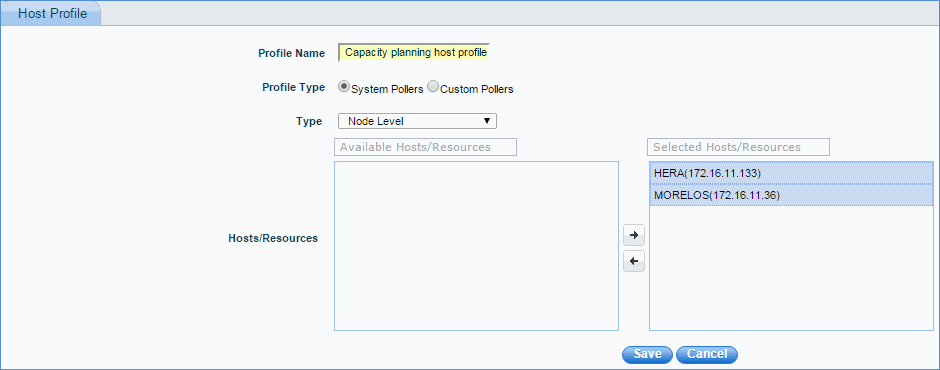
Enter the capacity planning host profile name and description.
Select the profile type. System pollers refer to all nodes/devices that are discovered. Custom pollers refer to applications, synthetic transaction pollers like Http, Ftp etc. or virtual machine pollers like VMWare, Xen server etc.
Based on the type of poller selected, select the hosts/resources to be added to the profile
Next, add the capacity planning rule as shown below.
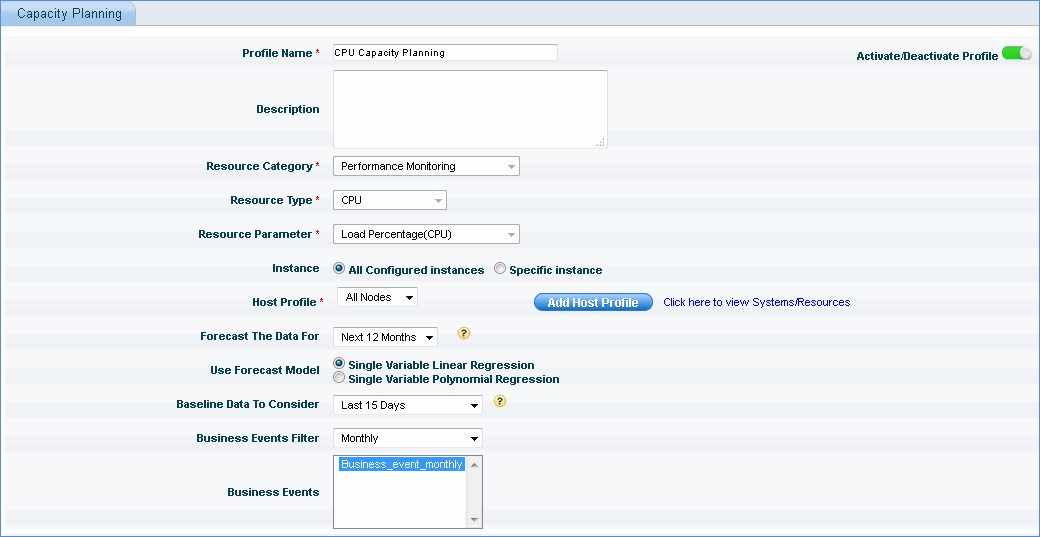
Enter the capacity planning rule name and description.
Select the resource category from the list.
Note: System service monitoring refers to system specific services
Select the appropriate resource type from the list
Select the appropriate resource parameter from the list. Based on the resource parameter, you may have to select the configured instance parameter.
Select the host profile for capacity planning from the list. Click 'Add Host Profile' to add a new host profile for capacity planning
Select 'Forecast the Data For'. This refers to the specific time interval for which the capacity prediction has to be done.
Select the option for 'Use Forecast Model'. In statistics, simple linear regression is the least squares estimator of a linear regression model with a single explanatory variable. In other words, simple linear regression fits a straight line through the set of n points in such a way that makes the sum of squared residuals of the model as small as possible. In statistics, polynomial regression is a form of linear regression in which the relationship between the independent variable x and the dependent variable y is modelled as an nth degree polynomial. Polynomial regression fits a nonlinear relationship between the value of x and the corresponding conditional mean of y, denoted E(y | x)
Select the option for 'Baseline Data to Consider'. This selects the data to be baselined for capacity planning calculation.
Select the business events applicable for capacity planning calculation.
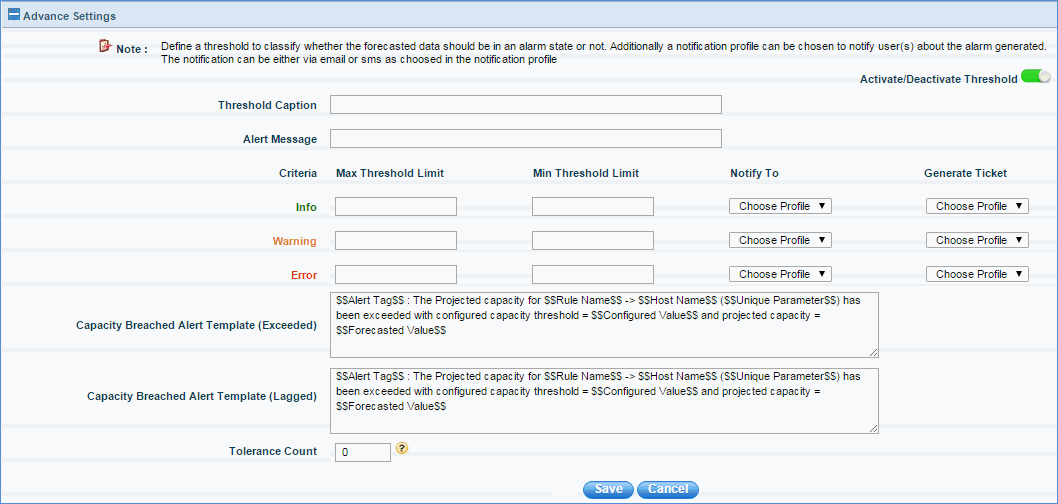
The capacity planning can be associated with a threshold to generate anticipated breaches either locally or globally. Local threshold is the one associated with the capacity planning rule.
After saving the rule, the capacity planning rule is listed as shown below

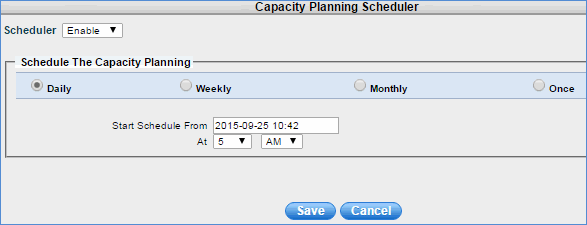
Click the Scheduler to change the capacity planning schedule for the configured capacity planning rule as shown below. By default, capacity planning is calculated at 5 A.M. on a daily basis.
Click 'Settings' then from the 'Fault and Notifications' section, click 'Thresholds'.
Click on 'Capacity Planning Thresholds'. Click on 'Add' to add the global threshold for capacity planning as shown below.
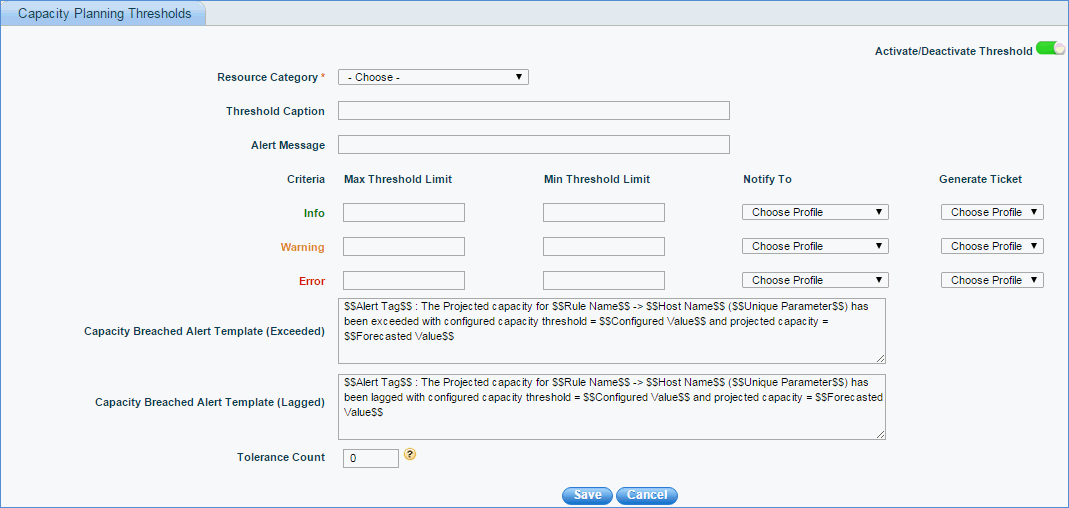
Note: Refer to Thresholds to add threshold details
A provision has been provided to exclude global threshold capacity planning for various device categories.
Click 'Settings' then from the 'Fault and Notifications' section, click 'Thresholds'.
Click 'Exclusion Profiles'. Click on 'Add' to add the exclusion profile for capacity planning as shown below.
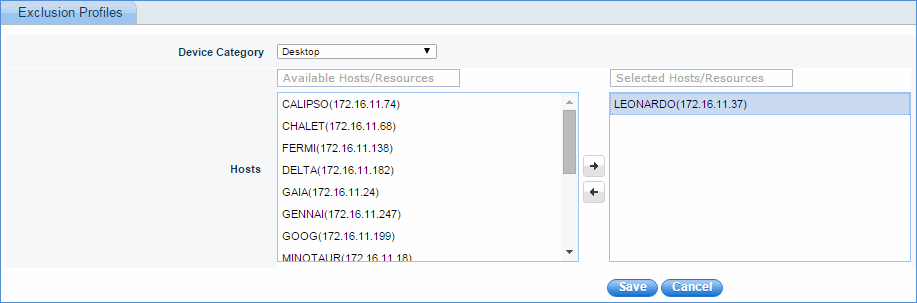
Select the device category and the hosts/resources which will be excluded from capacity planning global thresholds. No alert messages are sent to the excluded devices.