
SapphireIMS has a Mobile App through which basic operations on Service Desk can be carried. The App also supports Physical Asset Verification (PAV) and can be used for audits etc.
The App is available on both Android and iOS.
 Note: You can customize the
color themes in the App. In Settings, search for 'Default Theme for MobileApp'
and set the value as one of the listed ones. Refer to Settings->Advanced
System Settings->Global Settings for details. The theme color
can also be changed from within the App itself.
Note: You can customize the
color themes in the App. In Settings, search for 'Default Theme for MobileApp'
and set the value as one of the listed ones. Refer to Settings->Advanced
System Settings->Global Settings for details. The theme color
can also be changed from within the App itself.
Search for 'SapphireIMS'
mobile application in Google Play Store or iTunes. The application
will be listed with the Sapphire
icon  . Install it on your smart phone device.
Tap on the App to run.
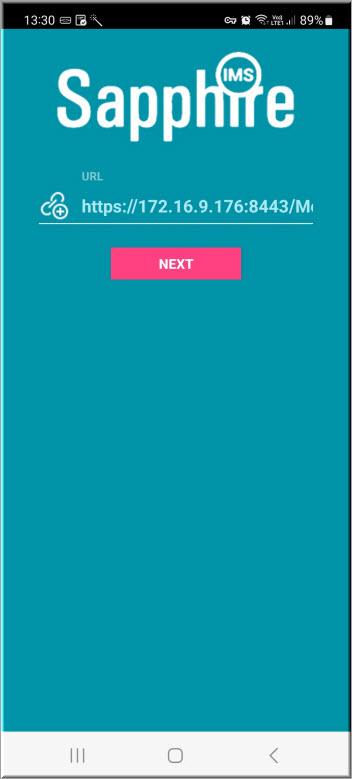
Enter the URL in the form :
'<http>or<https>://<SapphireIMS Server IP Address or FQDN>:<Port Number>/MobileApp'
Tap on 'Next'. The Login screen is displayed
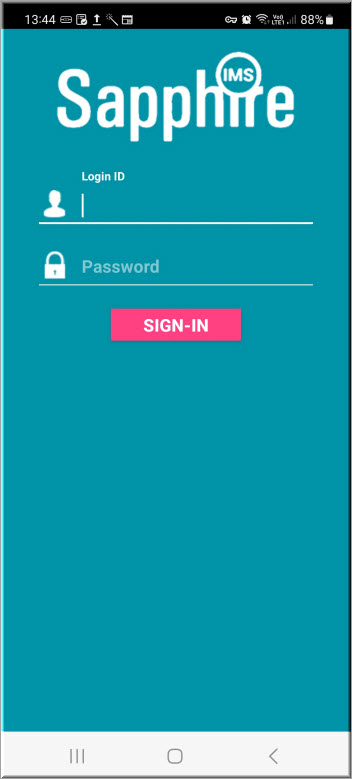
Enter the 'Login ID' and 'Password'. Tap on 'Sign-in'. The Home Page for Service Desk is displayed (if so configured) which by default is the Dashboard.
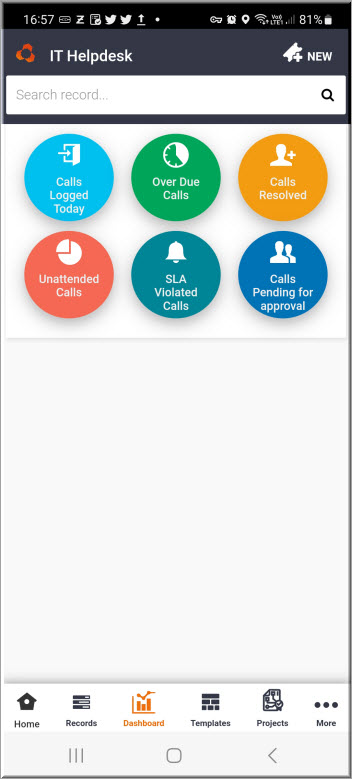
The next topic provides details on the Service Desk usage.
Note: SapphireIMS Mobile
App supports Internationalization. For localization support for specific
languages contact SapphireIMS Support.