
Profile Manager feature in SapphireIMS helps you to define profiles for the rules types mentioned below. These profiles are used in the patch management module in SapphireIMS
1. Patch Inclusion List - Select this profile to include hosts for patch management
2. Critical System List - Select this profile to include hosts that are critical like production servers for which there won't be any deployment of patches until they are manually approved. For devices which are set as critical systems, the patch deployment will always be only on approval
3. Patch Exclusion List - Select this profile to exclude hosts from patch management
4. Client Task Agent Profile - Select this profile to include hosts for agent tasks. See Client Task Agent
5. Proxy Settings - Select this profile to define Proxy Settings Profile for all Linux flavors other than RHEL and SUSE Enterprise
6. Linux Subscription Account - Select this profile to create a Linux Subscription Account for Linux flavors RHEL and SUSE Enterprise
Click the 'Settings' tab. In the 'Software Management' section, click 'Profile Manager'
Select the Rule Type and click 'Add' (In the below example, 'Patch Inclusion List' is selected as 'Rule Type')
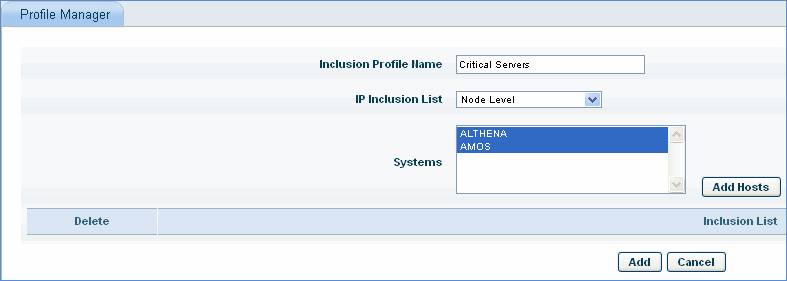
1. Enter the Inclusion Profile Name
2. Select the criteria for IP Inclusion List
3. Select the nodes and click 'Add Hosts'
4. Click 'Add'