
The topics following this describe the configuration of SapphireIMS Service Desk. Before the Service Desk can be used, there is a configuration to be done which involves defining the access controls, workflow, notifications and alerts, the service level agreements and automations for operating the Service Desk.
The Service Desk is based on the concept of a logical entity called a record. Submitters (end users) can submit a record and it is acted upon by the owner who is assigned to that record.
Records are categorized in multiple levels with the Project being categorized at the highest level. At subsequent levels, there are services, categories and sub-categories etc. Once the categorization is done the record transitions through the states of a workflow (which mirrors the process) defined for that particular categorization.
Apart from characterizing the record using the above, the record can be further categorized based on the severity, urgency or priority.
There are certain pre-defined categorizations and workflows which are based on ITIL standards. In SapphireIMS Service Desk, these are available for Incident Management, Service Request, Change Management and Problem Management. A new project can be defined based on one of these project types where it will inherit the characteristics or start from a blank template. Even if a project is based on a pre-defined project type it can be customized depending on the process followed in the organization.
In addition to ITIL based processes, SapphireIMS has also a number of pre-defined process templates for enterprise business processes like HR, Procure-to-Pay etc. which can be used as a starting point and quickly adapted.
For each project, access control is defined by defining the users and the roles they are entitled. The role definition specifies what is allowed. Certain basic roles are in-built and new roles can be defined which inherit the basic properties of the in-built roles.
Based on the categorization of the record, SLA (Service Level Agreements) can be defined for monitoring. SapphireIMS can not only report on breach of SLA but also about potential breaches.
Information about changes in the record including state changes, SLA breaches etc. can be notified via e-mail or SMS. SapphireIMS allows the templates for communication to be customized along with rules on whom to alert and under what conditions. SapphireIMS has provision for defining escalation levels where automatic escalations are sent to different levels as per defined rules.
The record content itself can be customized. While there are certain fields which are in-built (fixed fields), new fields can be defined (additional fields) using the basic field types available in SapphireIMS. There are fine controls available to display these fields in selected states only.
Using Custom Business Rules or Robotic Process Automation (RPA), automation of processes can be achieved.
A service catalog can be defined along with 'Quick' Templates for easy submission of records.
There is a provision to define CSAT feedback questions and collecting feedback from end users.
Before starting with the configuration, the project needs to have been created. Refer to Settings->Service Desk Configurations->Project Creation for the steps for creating a new project.
 Note: Access to configure
the project is only allowed for the users who have been setup as Project
Administrators while creating the project.
Note: Access to configure
the project is only allowed for the users who have been setup as Project
Administrators while creating the project.
If you have been given access as a Project Administrator, when
logging into Service Desk, you can see the  icon
on the right top corner. Click on that and the following screen is
displayed.
icon
on the right top corner. Click on that and the following screen is
displayed.
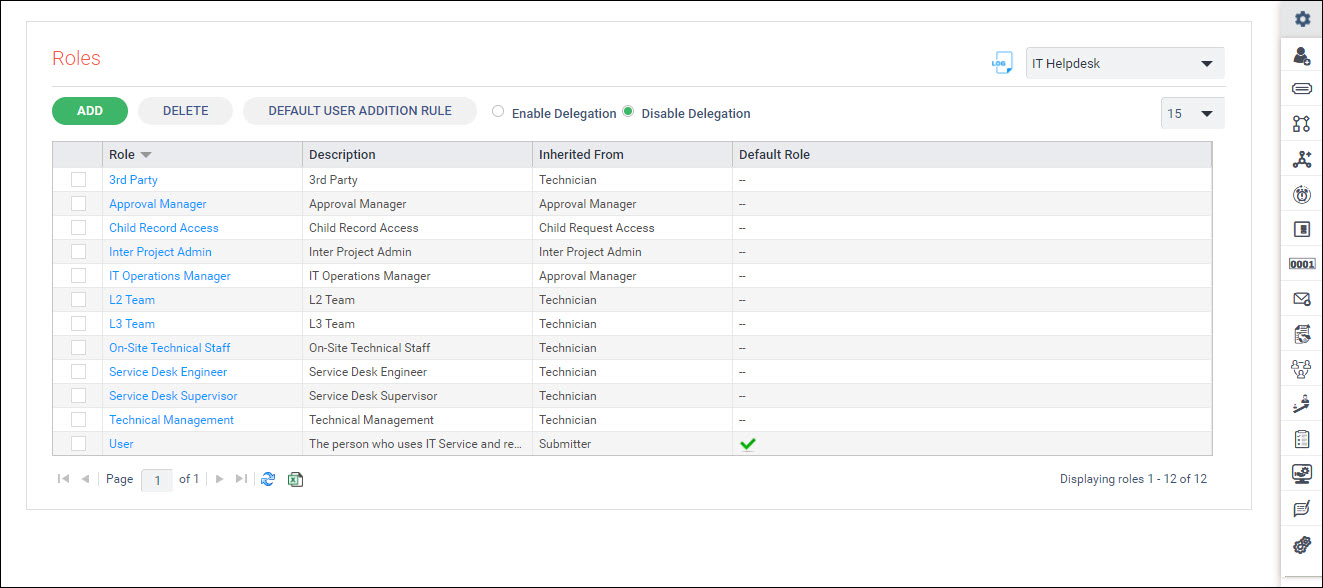
Select the project to be configured from the drop down menu on the right side.
On the right side panel the icons for each configuration is displayed. On hovering on the right panel, it expands as follows.
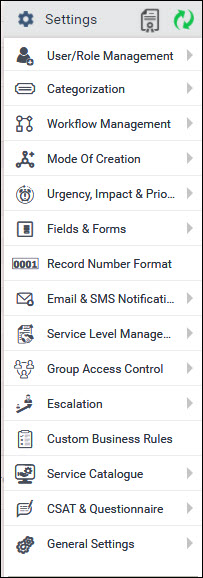
The list of configuration options is explained in detail in the topics which follow.
Note: If any configuration
is changed click on  to refresh the settings cache
for the change to take effect.
to refresh the settings cache
for the change to take effect.
You can view the license usage for Service Desk by clicking
on the  icon. The license usage details are displayed.
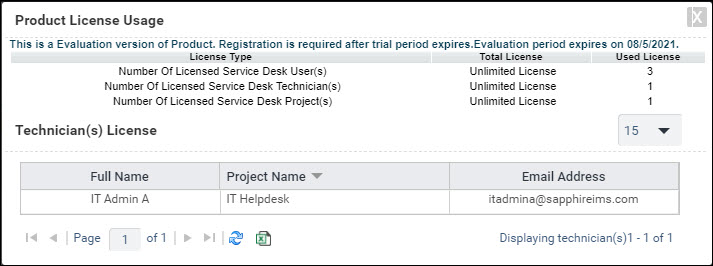
The license information can be exported to Excel by clicking
on  .
.
You can get an audit log of all changes for any of the configuration settings.
On any settings page, click  button on the
top of the page. The corresponding listing of all changes to the setting
will be displayed.
button on the
top of the page. The corresponding listing of all changes to the setting
will be displayed.
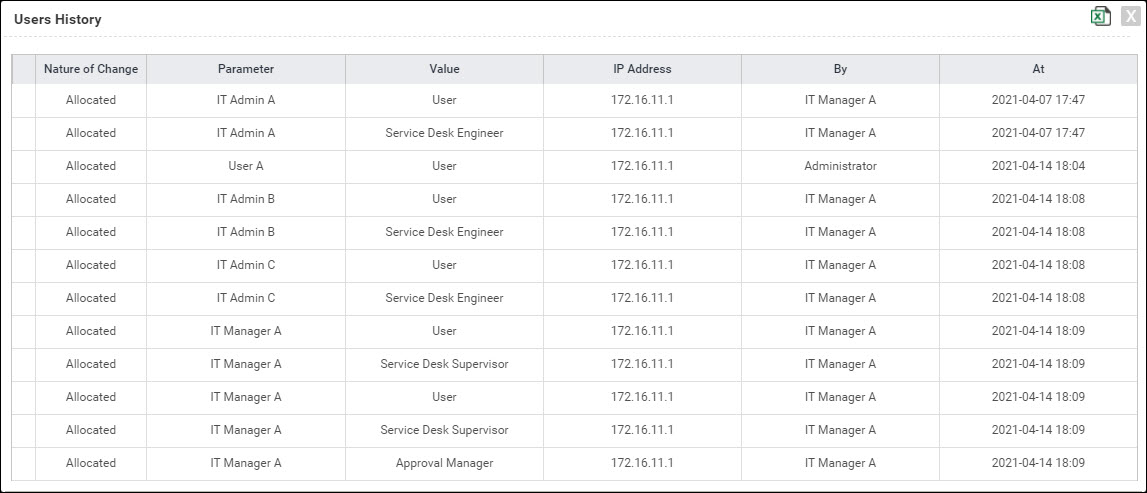
The change along with the parameter and value is displayed. Along with this the user who made the change, the IP address of the system from where the change was made and the time stamp is displayed.
Click on to export the audit history to Excel.
On any screen you can click on to export
the configuration listing to Excel.
Any screen can be refreshed by clicking on  icon.
icon.
To select the project for which the configuration has to be
done, click on the drop down  .
.
While listing any settings, the number of rows to display on
a page can be controlled by selecting in 
Use the page navigation options  at the bottom of the page to navigate forward and
backward across pages.
at the bottom of the page to navigate forward and
backward across pages.