
The inputs for incident management mostly come from the service desk users. The Incident management team will detect and record the incident. Based on the ITIL standard, SapphireIMS follows a process flow for incident management which is explained below.
This process flow is configured keeping in mind the ITIL Incident Management life cycle. As you can see below, an incident follows a top down process from the start of its life cycle to the end when it is resolved. This whole process happens in a very short duration of time and should ideally happen in the time interval specified as per the SLA (service level agreement), or else the incident record will have the incident status as SLA violated. For more information on SLA, please refer to SLA
During the course of its life cycle it can be assigned to level 2 service desk engineers depending on the criticality/type of the incident. In the diagnosis and investigation stage a third party can be involved in case of part replacement.
SapphireIMS allows two types of escalations at any point of time in an incident's life cycle - ‘Functional Escalation’ and ‘Hierarchical Escalation’, each of which is explained in detail later in this user guide.
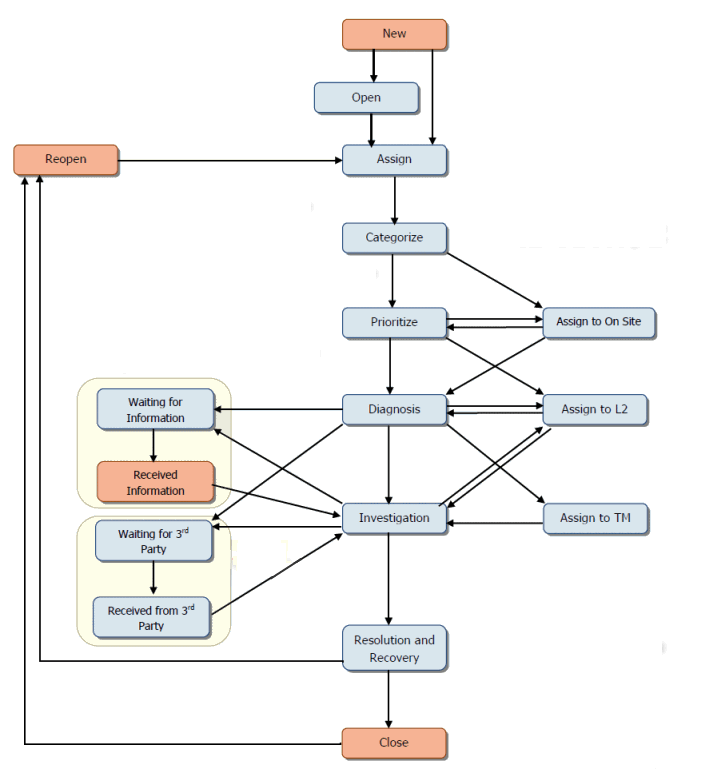
If the incident is a major incident then it follows a slightly different workflow compared to a normal incident as given below:
Prioritize > Assign to L2 / Assign to On Site >Diagnosis > Follows the workflow as configured
|
States |
Description |
|
New |
A user/ service desk supervisor will report incidents against the service and assign it to the first level technician
|
|
Open |
indicates that the ticket is Open and has to be assigned to a service desk engineer
|
|
Assign |
Service Desk Supervisor will assign the incident to a service desk engineer
|
|
Assign to On Site |
Service Desk Engineer can assign the incident to on-site engineer
|
|
Assign to L2 |
On-Site technical staff can assign the incident to level 2 service desk engineers
|
|
Assign to TM |
Level 2 service desk engineers can assign the incident to TM
|
|
Categorize |
Service desk engineer will categorize the incident if required by negotiating with the user
|
|
Prioritize |
Service desk engineer will prioritize the incident based on the business impact it is causing
|
|
Diagnosis |
Service desk engineer will diagnose the incident to provide workaround or resolution
|
|
Investigation |
Incident details are reassessed and related information is analyzed
|
|
Waiting for Information |
If any information is required for investigating the incident, On-Site technical staff can move the incident to Waiting for Information state
|
|
Received Information |
Once information is received, On-Site technical staff can move the incident to Received Information state |
|
Waiting for 3rd Party |
If the incident requires a vendor intervention, the incident is moved to Waiting for 3rd party state |
|
Received from 3rd Party |
Once vendor intervention is received, the incident is moved to Received from 3rd Party state |
|
Resolution and Recovery |
The service desk engineer will resolve the incident by updating the resolution notes |
|
Close |
The user or submitter will close the incident. technician also can close the incident after getting confirmation from user
|
|
Reopen |
The incident can be reopened after it is moved to 'Resolve' or 'Close state and once again assigned to a service desk engineer if required
|