
To enable collection of SNMP traps follow the steps given below.
Click the ‘Settings’ tab. In the ‘Fault and Notifications' section click ‘SNMP Traps'. This will list all the managed nodes.
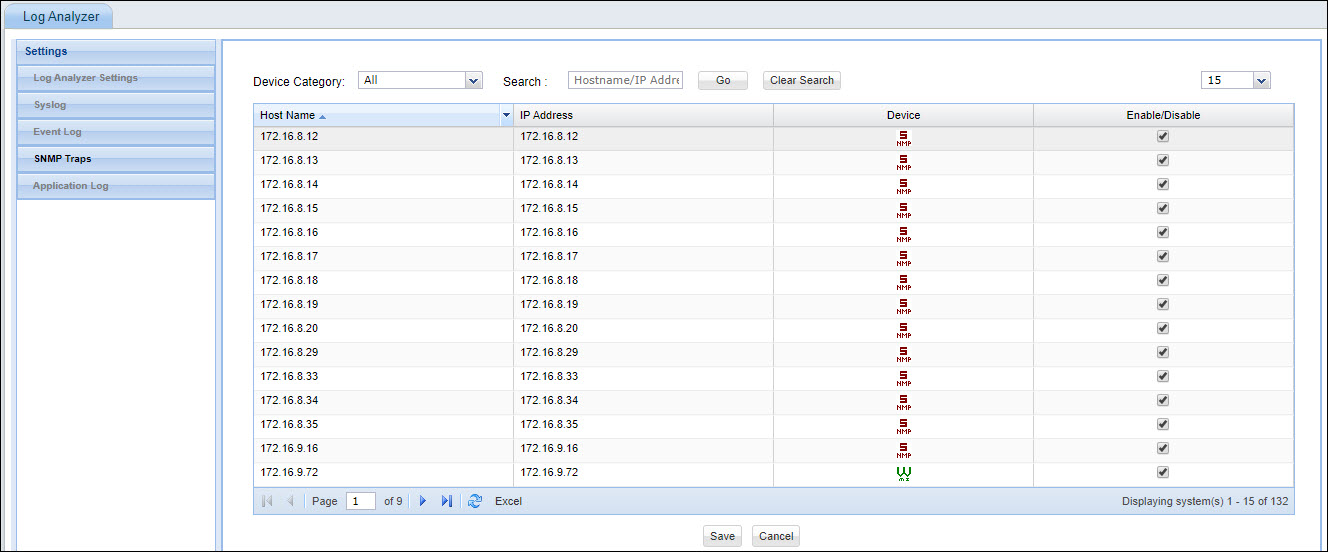
In the ‘Device Category’ list box, select the desired device category to view all the devices in that category.
Check the boxes corresponding to the desired hosts which have to be enabled for SNMP traps data collection and click on ‘Save’.
 Note:
Even though SNMP Trap service and SNMP service is enabled in the device,
the corresponding configuration has to be in place on the device to enable
forwarding of SNMP Traps to the SapphireIMS system. This is explained
in detail in the Appendix section Setting
up SNMP Traps Forwarding
Note:
Even though SNMP Trap service and SNMP service is enabled in the device,
the corresponding configuration has to be in place on the device to enable
forwarding of SNMP Traps to the SapphireIMS system. This is explained
in detail in the Appendix section Setting
up SNMP Traps Forwarding