Sr. No |
Field
Name |
Description |
1 |
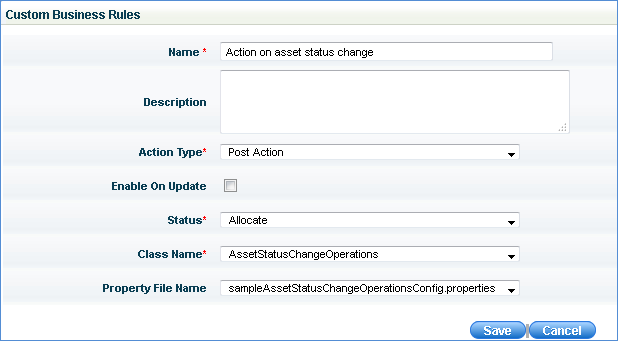
Name |
Enter the name of the asset action
rule
|
2 |
Description |
Describe the action in simple words
|
3 |
Action
Type |
You can select Pre or Post
action or Mail Notification. Pre action means the business
rule is executed before database update and post action means
the business rule is executed after database update. Select Mail Notification
option if mail notification has to be sent on change of specific
asset field values. Mail notification can be sent on change
of asset field values or to indicate asset stock level. The following macros are
supported for indicating change in asset fields:
MACRO_ASSETID
MACRO_ASSET_NUMBER
MACRO_ASSET_TYPE
MACRO_USERID
MACRO_ALLOCATED_TO i.e Allocated
User
MACRO_LINKED_INVENTORY i.e, SystemID
MACRO_ASSET_STATUS
MACRO_LOCATION
MACRO_DEPARTMENT
MACRO_TOTAL_COUNT
MACRO_AVAILABLE_COUNT
Note:
Refer to Mail
Notification Templates and Mail
Notification Rules to send mail notifications
|
4 |
Enable on
Update |
Check this box if you want the action
to occur on every asset field update.
Note:
If unchecked, the action will execute on only asset status field
update.
|
5 |
Status
|
Select the asset status from the
drop down |
6 |
Class Name |
There are some default classes provided
which contain business rules. Select a class which contains the
business rule
|
7 |
Property File Name |
Select the property file name, which
is a script that will be executed pre or post the action selected
in the action type
Note:
To provide custom error message during pre or post action execution,
go to <Installed Folder>\SapphireIMS\WebManagement\standalone\deployments\SapphireIMS.war\WEB-INF\classes\sapphire\assetactions
and open 'sampleAssetStatusChangeOperationsConfig.properties'
file. Enter the error message to be displayed
|